
 Sign up
Which competitors are moving?
Track launches, new pages, pricing moves, campaigns and positioning shifts.
Use business intelligence proxies to collect public competitor data, price movements, company profiles, job postings, news, reviews, real estate listings, and regional demand signals. Access localized web results from the markets that matter, compare changes by country or city, and turn reliable public data into actionable insights for strategy, sales, and operations.
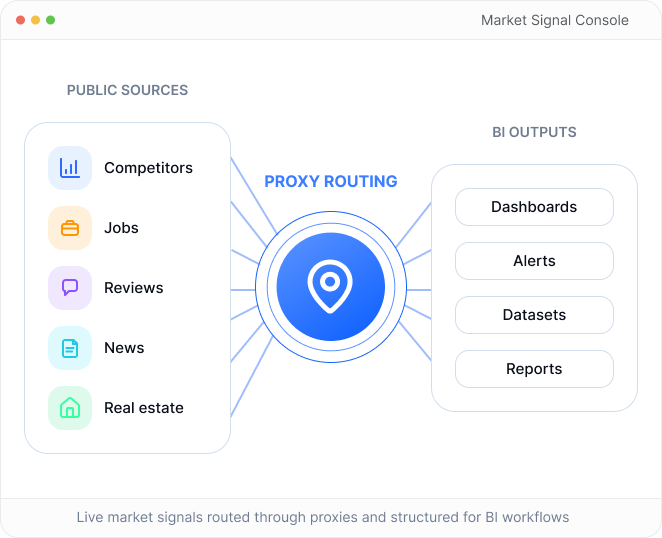
Business intelligence is useful when it turns fragmented public signals into answers teams can act on: growth, pricing, demand, customer feedback and market opportunities.
Track launches, new pages, pricing moves, campaigns and positioning shifts.
Compare search visibility, review volume, listings and regional activity.
Detect discounts, public prices, bundles, promotions and regional gaps.
Use hiring, offices, launches and press activity as expansion signals.
Analyze reviews, ratings, sentiment themes and recurring pain points.
Spot category growth, travel prices, real estate and opportunity signals.
Three related disciplines, three different decision layers. The page should make this distinction instantly clear.
Turns public online signals into dashboards, reports, alerts and datasets for strategy, pricing, product, sales and operations teams.
Public signals into decisionsStudies markets, audiences, demand, pricing and category movement using public sources, directories, reviews, listings and news.
Market context and trendsMonitors competitor pages, launches, hiring, pricing, messaging and regional activity to detect strategic movement over time.
Competitor movement reportsMarket research studies the market. Competitive intelligence studies competitors. BI turns both into measurable data and decisions.
Public sources go in; proxy routing, page capture, extraction, normalization and comparison turn market signals into dashboards, alerts, datasets and reports.
Sources
Collection plan
Proxy routing
Capture
Extract
Normalize
Compare
BI outputs
Define the public websites, directories, competitor pages, job boards, review sites, news pages and listings that can produce useful market signals.
sources = ["competitors", "jobs", "reviews", "news"]targets = discover.publicPages(sources)priority = score.bySignalValue(targets)schedule = cadence.assign(priority, "daily")# -> BI source map ready for collection
Market signals are fragmented across websites, listings, directories, news, reviews and search surfaces. Treat them as a catalog of public data sources, not a flat list.
Track public pages, launches, messaging changes and positioning shifts across competitor sites.
Monitor public SKUs, prices, availability, attributes and category-level product movement.
Collect public company profiles, locations, segments, firmographics and market coverage signals.
Follow press, public mentions, events and industry changes that affect market research.
Use public job posts to detect hiring volume, roles, locations, salaries and expansion signals.
Analyze public ratings, review themes, sentiment shifts and recurring customer feedback.
Track public fares, routes, hotel rates and regional travel pricing across markets.
Compare public prices, inventory, regions, property types and local market movement.
Collect public visibility, demand, SERP features and competitor presence by query.
Surface public topics, feedback, user language and demand signals from open communities.
Without regional verification, a BI report can describe one data-center viewpoint instead of the real market. Prices, product availability, job markets, travel fares, search results and real estate listings can all change by location and timing.
Prices differ by country and currency
Product availability differs by regional inventory
Job markets differ by city and seniority mix
Travel fares and hotel rates move by source region
Search results and public mentions change constantly
EUR catalog, regional promos
US inventory and local demand
Routes, fares and source-region pricing
Localized SERP and public mentions
One server in one location shows only a slice of the market. Regional proxy coverage helps BI teams collect the market view they actually need.
Enterprise data teams care about freshness, coverage and trust. These risks make the proxy layer feel like infrastructure rather than decoration.
Collected data does not match the target region.
Market signals are spread across many websites and formats.
Page layouts change and parsers break.
The same company, product or listing appears in multiple forms.
Important values are hidden, delayed or loaded through JavaScript.
Old records make dashboards misleading.
Too much collection depends on one server address.
Expensive IPs are wasted on open sources, weak IPs fail on stricter sources.
Four IP types - each one optimised for a different scraping job. Mix and match in the same project. Same API, different cost-per-success.
Fast, cheap, predictable. Perfect for open public sources, directories and high-volume checks without strict bot mitigation.
Best forReal IPs from user devices. The most flexible option for general public market data collection and regional verification.
Best forISP-assigned static IPs with residential trust and datacenter speed for longer sessions and logged-in research workflows.
Best forGenuine 4G/5G IPs from real phones. Useful for mobile-only surfaces, carrier checks and restrictive app-like experiences.
Best forThese cards should feel like the final BI dashboard the buyer wants to build: freshness, coverage, reliability, trend movement and market signal quality.
New pages, launches, pricing changes
Search visibility, review volume, availability
Job volume, skills, salaries, locations
Last collected, update frequency, stale records
Sources, regions, verticals, locations
Rating shifts, themes, complaint clusters
Fares, hotel rates, seasonal demand
Firmographics, segments, enrichment fields
Success rate and source health
Listings, price shifts, availability
Mentions, launches, press events
Discounts, bundles, regional gaps
Three concrete enterprise scenarios make the page feel like a BI solution, not a generic proxy article.
A strategy team tracks competitor websites, product pages, hiring activity and news mentions across multiple countries to detect expansion signals.
A sales team collects public company data from directories, websites and public databases, then enriches CRM records with firmographics and market segments.
A pricing team monitors public prices, discounts and bundles across regions to detect competitor price movement and market gaps.
Business intelligence workflows should focus on publicly available data, respect applicable laws, website terms and privacy rules, and avoid private, sensitive or confidential information.
Business intelligence proxies are proxies used to collect public web data for market research, competitor monitoring, pricing analysis, product intelligence, and trend tracking. They help BI teams access data from different locations and reduce IP-based limits during large-scale research. This makes public data collection more consistent for analytics workflows.
Proxies are used for market research by helping collect public information from websites, marketplaces, directories, search results, forums, review platforms, and regional pages. They allow researchers to compare data across countries and markets without relying on a single IP address. This is useful for competitive intelligence, demand analysis, and market expansion research.
The best proxies for competitor intelligence are usually residential proxies when targets are protected or location-sensitive. They help collect public competitor data such as pricing, content changes, product availability, reviews, search visibility, and regional offers. Datacenter proxies can be useful for simple websites with low anti-bot protection.
Yes. Proxies can help collect public data for dashboards, analytics, forecasting models, and internal reports. By distributing requests and using location targeting, proxies make it easier to gather structured information from multiple public sources. The collected data can then be cleaned, analyzed, and used for business decisions.
BI teams need geo-targeted proxies because many websites show different content depending on country, region, city, language, or currency. Without location targeting, market data may be incomplete or misleading. Geo-targeted proxies help compare regional prices, availability, promotions, search results, and public demand signals.
Yes. Proxies can support industry trend monitoring by collecting public signals from search results, marketplaces, news pages, directories, product listings, reviews, and social platforms where allowed. This helps teams identify new competitors, category growth, pricing changes, and customer demand shifts. Proxies make repeated monitoring more reliable across multiple regions.
Residential proxies are useful for BI data collection when websites are protected, geo-sensitive, or likely to block datacenter traffic. They provide access through real ISP networks and can improve stability for public data gathering. For simple sources, datacenter proxies may be enough, but residential proxies are safer for sensitive targets.
Yes. Proxies are commonly used for pricing intelligence because prices often vary by region, customer location, currency, delivery area, or marketplace. With geo-targeted proxies, BI teams can compare pricing across markets and monitor changes over time. This is useful for retail, travel, SaaS, marketplaces, and competitive analysis.
For automated BI workflows, rotating residential proxies are a strong default when collecting public data from multiple sources. Sticky sessions may be needed for websites that require consistent browsing behavior or multi-step navigation. The best setup depends on target websites, update frequency, request volume, and required location coverage.
No. Proxies do not replace BI platforms, data warehouses, or analytics tools. Proxies help with the data collection layer by improving access, location targeting, and request distribution. The collected data still needs to be cleaned, normalized, stored, analyzed, and visualized with proper BI infrastructure.
Use Residential proxies for regional market checks, Residential Pro for stricter public sources, Mobile for mobile-only surfaces, Datacenter for fast testing and Static IP products for stable integrations.
Check Eligibility